Model Context Protocol (MCP): Revolutionizing Software Development with LLMs — A Practical Demo on Search
Originally published on Medium.
1. Introduction
The integration of Large Language Models (LLMs) with traditional software systems creates both opportunities and challenges. As AI adoption accelerates, developers need standardized ways for LLMs to interact with specialized tools.
Model Context Protocol (MCP), introduced by Anthropic, provides this standardized communication framework designed for adoption across the industry. It enables LLMs to discover and use specialized tools through a consistent JSON-based protocol, establishing a well-defined interface that helps address challenges like hallucinations, outdated information, and limited functionality that pure LLMs often face.
This article aims to:
- Introduce MCP: Provide a high-level overview of Anthropic’s Model Context Protocol and its core concepts
- Demonstrate Practical Implementation: Explore a working e-commerce search demo that showcases how MCP enables intelligent natural language search
- Reflect on Broader Impact: Examine how MCP is reshaping software development practices and organizational structures
The e-commerce search demo in Section 4 presents how MCP transforms a basic search engine into an intelligent system that understands natural language queries. The complete source code is available on GitHub (also see References).
2. What is Model Context Protocol (MCP)
MCP is a standardized communication framework developed by Anthropic that connects LLMs with external tools and services. It consists of two key components:
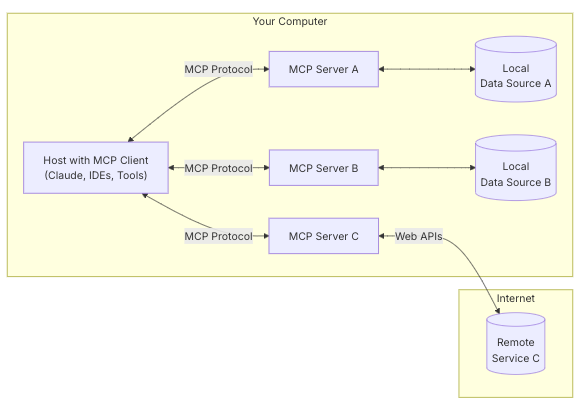
MCP General Architecture [1]
MCP Server: Hosts tools (functions) with defined purposes, parameters, and return types. Each tool registers with metadata describing its functionality. In our demo, the server provides search and indexing tools for Elasticsearch.
MCP Client: Communicates with the server by listing available tools, calling them with arguments, and handling results. The client typically bridges between an LLM and specialized tools.
The interaction follows a simple pattern:
- Discovery: Client requests available tools
- Introspection: Server provides tool descriptions and schemas
- Invocation: Client calls tools with appropriate arguments
- Execution: Server performs the requested actions and returns results
This separation of concerns enables independent evolution while maintaining compatibility through the defined protocol.
3. MCP’s Relationship with LLMs
MCP and LLMs create a powerful division of responsibilities:
LLMs as Decision Makers: LLMs excel at understanding natural language, determining appropriate tools to use, and translating between user requests and structured tool calls.
MCP as the Execution Layer: MCP provides the structured means to access databases, APIs, and other services that LLMs cannot directly interact with.
This synergy addresses key limitations of using LLMs alone:
- Reduced Hallucinations: By delegating factual tasks to external tools
- Current Information: Accessing real-time data beyond the LLM’s training cutoff
- Specialized Capabilities: Implementing complex domain-specific functionality
- Security and Control: Encapsulating sensitive operations within controlled tools
The result is a more robust, accurate system than either component could achieve independently.
4. Practical Demonstration — Inside the search_mcp_demo
I developed a search_mcp_demo presenting a practical implementation of MCP for e-commerce search. Let’s examine how the different components work together:
4.1 MCP Components in the Codebase
The demo’s MCP implementation consists of these key parts:
- MCP Server (
search_mcp_pkg/core.py): Defines and registers tools using FastMCP:
# Initialize FastMCP server
mcp = FastMCP("search")
@mcp.tool()
def search(query: str, index: str = DEFAULT_INDEX) -> str:
# Implimentation
...
@mcp.tool()
def search_products_by_category(
category: str,
min_price: float = 0,
max_price: float = 1000,
min_rating: float = 0,
in_stock_only: bool = False,
index: str = DEFAULT_INDEX,
) -> str:
# Implimentation
...- MCP Client (
claude_search_mcp_demo.py): Communicates with the server using the MCP protocol:
class MCPClient:
    """Simple client for interacting with the MCP server."""
    def list_tools(self):
            """List all available tools from the MCP server."""
            message = json.dumps({"id": message_id, "type": "list_tools"}) + "\n"
            # Send message and process response...

    def call_tool(self, tool_name, args):
        """Call a tool on the MCP server with detailed step logging."""
        message = json.dumps({"id": message_id, "type": "tool_call",
                             "tool": tool_name, "args": args}) + "\n"
        # Send message and process response...
4.2 Communication Flow Between Client and Server
The communication between the MCP client and server follows a structured protocol that ensures reliability and clear expectations. Here’s what happens during a typical interaction:
- Connection Establishment: When the demo starts, the MCP server initializes and begins listening for incoming connections. The client connects to this server process using a simple text-based communication channel.
- Tool Discovery: The client sends a
list_toolsmessage to discover available capabilities
{ "id": "msg-1", "type": "list_tools" }3. Tool Description Response: The server responds with detailed tool descriptions:
{
  "id": "msg-1",
  "type": "list_tools_response",
  "tools": [
    {
      "name": "search",
      "description": "Search for products matching a query with LLM-powered query planning.",
      "parameters": {
        "query": {"type": "string", "description": "The search query"},
        "index": {"type": "string", "description": "The Elasticsearch index to search"}
      },
      "return_type": {"type": "string", "description": "Formatted search results"}
    },
    {
      "name": "create_ecommerce_test_index",
      "description": "Create a test e-commerce index with sample products",
      "parameters": { ... },
      "return_type": { ... }
    }
    // Additional tools...
  ]
}
4. Tool Invocation: When a user submits a natural
language query like “find wireless headphones with noise cancellation,”
the LLM (or our simulation of it) decides to use the search tool and
prepares parameters. The client then sends a tool_call
message:
{
  "id": "msg-2",
  "type": "tool_call",
  "tool": "search",
  "args": {
    "query": "wireless headphones with noise cancellation",
    "index": "ecommerce"
  }
}
5. Tool Execution & Response: The server executes the requested search function, which includes generating a sophisticated query plan using OpenAI and executing the search against Elasticsearch. It then returns the results:
{
  "id": "msg-2",
  "type": "tool_call_response",
  "result": "Search results for: wireless headphones with noise cancellation\n\nQuery plan:\n{\"should_expand\": true, \"expanded_query\": \"wireless headphones noise cancellation anc bluetooth\", ...}\n\nResults:\nProduct 1:\nName: Premium Wireless Headphones\nBrand: SoundMaster\nPrice: $199.99\n..."
}
6. Error Handling: If a tool call fails, the server returns an error message that helps the client understand what went wrong:
{
  "id": "msg-3",
  "type": "error",
  "error": "Index 'nonexistent_index' not found"
}
This structured message exchange creates a clean separation between the LLM’s intent (expressed through the client) and the execution logic (handled by the server).
4.3 Two Fundamental Approaches to Using MCP
There are two primary ways developers can integrate MCP into their applications:
1. Direct Use in Code: Developers can directly use MCP in their application code, calling MCP tools programmatically for specific tasks. This approach provides precise control over when and how tools are used, and is ideal for scenarios where:
- The application logic clearly dictates which tool should be used
- Performance and reliability are critical, requiring deterministic behavior
- Complex workflows need direct integration with existing systems
- The user interface is structured rather than conversational
Example of direct MCP usage in code:
# Direct call to MCP tool
result = client.call_tool(
    "search",
    {"query": query, "index": INDEX_NAME})
)
2. Passing as Tools for LLMs: Alternatively, MCP tools can be registered with LLMs as available functions, allowing the LLM to decide when and how to use them. This approach leverages the LLM’s natural language understanding to:
- Interpret user intent and select appropriate tools
- Extract parameters from conversational context
- Format results in natural language
- Handle ambiguity and clarification
Example of MCP tools being used by Claude:
# Convert MCP tools to Claude's format
claude_tools = []
for tool in client.list_tools():
    # Convert parameters to Claude's expected schema format
    parameters = tool.get("parameters", {})
    input_schema = {"type": "object", "properties": {}, "required": []}

    if "properties" in parameters:
        for param_name, param_details in parameters.get("properties", {}).items():
            input_schema["properties"][param_name] = {
                "type": param_details.get("type", "string"),
                "description": param_details.get("description", ""),
            }

        # Add required fields if they exist
        if "required" in parameters:
            input_schema["required"] = parameters.get("required", [])

    claude_tools.append({
        "name": tool.get("name"),
        "description": tool.get("description", ""),
        "input_schema": input_schema,
    })

# Call Claude with tools parameter
response = claude_client.messages.create(
    model="claude-3-opus-20240229",
    max_tokens=1024,
    system=system_prompt,
    messages=[{"role": "user", "content": user_query}],
    tools=claude_tools,
)

# Process different content types in the response
tool_calls = []
for content in response.content:
    if hasattr(content, "type") and content.type == "tool_use":
        # This is a tool use block from Claude
        tool_calls.append({
            "name": content.name,
            "parameters": content.input if hasattr(content, "input") else {},
        })

# Handle tool calls if any
if tool_calls:
    for tool_call in tool_calls:
        tool_name = tool_call["name"]
        tool_params = tool_call["parameters"]

        # Ensure index parameter is set for search queries
        if "index" not in tool_params:
            tool_params["index"] = "ecommerce"

        # Execute the MCP tool call
        tool_result = client.call_tool(tool_name, tool_params)

        # Ask Claude to process the tool result
        final_response = claude_client.messages.create(
            model="claude-3-opus-20240229",
            max_tokens=2048,
            system=system_prompt,
            messages=[
                {"role": "user", "content": user_query},
                {"role": "user", "content": f"Tool result: {tool_result}"}
            ]
        )
Each approach has its strengths and use cases. In complex applications, developers often use both approaches — direct calls for critical operations with predictable inputs, and LLM-mediated calls for handling natural language requests. Our search demo implements both approaches to showcase their relative advantages.
4.4 MCP Search Flow Example
The following diagram demonstrates an example of MCP as tools for LLMs (along with its corresponding code)
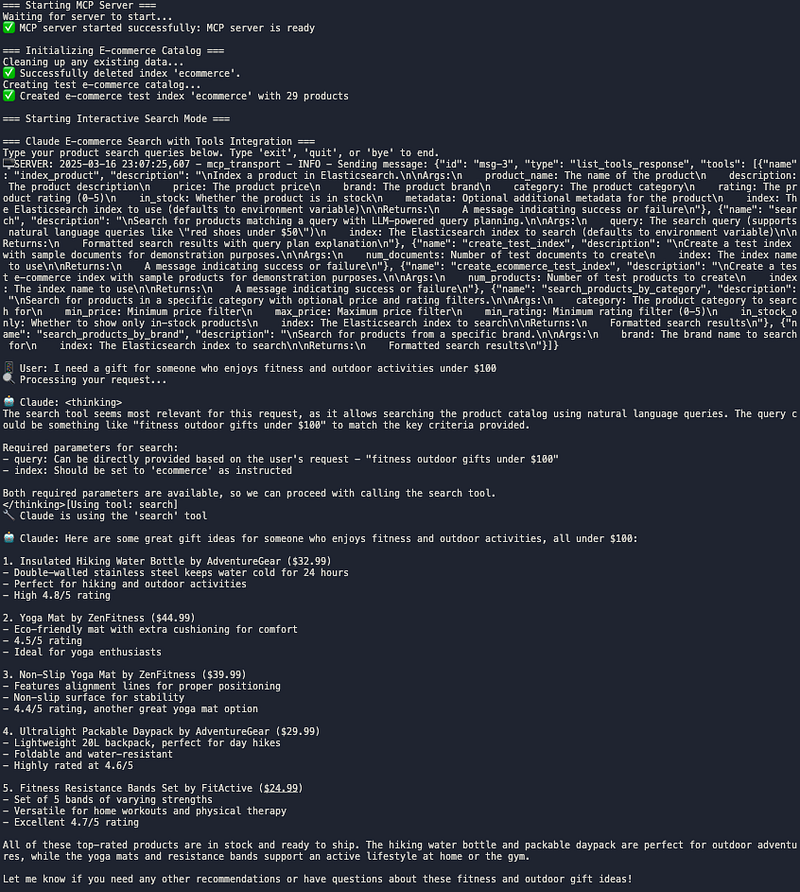
We can see this architecture in action through a real example. When a user asks “I need a gift for someone who enjoys fitness and outdoor activities under $100”, here’s exactly what happens:
- LLM Internal Reasoning: Claude analyzes the query and decides the search tool is most appropriate for finding relevant products.
- Tool Selection: Claude prepares the parameters: query=“fitness outdoor gifts under $100” and index=“ecommerce”.
- MCP Communication: The client sends the
tool_callto the MCP server. - Query Planning: The server generates an appropriate search strategy for Elasticsearch using LLM
- Search Execution: Elasticsearch queries the product catalog using the optimized search parameters.
- Result Retrieval: The MCP server returns the search results to the client.
- Processing: The client passes the results to Claude.
- Result Formatting: Claude formats the results into a helpful list of five gift recommendations under $100
This workflow demonstrates the practical application of the division of responsibilities described in Section 3, with clean separation between natural language understanding and specialized search functionality.
5. Benefits of MCP for Software Development
MCP solves several key engineering challenges while significantly enhancing development productivity:
Engineering Benefits
Separation of Concerns: Extends the division of responsibilities discussed in Section 3 to the code level. In our demo, Elasticsearch functions reside in the server while communication logic stays in the client.
Standardized Interfaces: Creates consistent interfaces for tools, simplifying system integration and maintenance.
Improved Testing: Tools can be tested individually without involving LLMs, streamlining debugging and validation.
Modular Architecture: New capabilities can be added without modifying existing code.
Better Versioning: Makes protocols explicit, reducing the risk of breaking changes.
Productivity Gains
Rapid Prototyping: The clear interface between LLMs and tools enables quick feature iteration. Our search demo started with basic capabilities and progressively added sophisticated features without architectural disruption.
Reduced Integration Overhead: The standardized protocol eliminates custom integration code, allowing developers to focus on core functionality rather than communication mechanics.
Simplified Prompt Engineering: LLM prompts can focus on decision-making rather than implementation details, leading to more effective interactions.
Accelerated Iteration Cycles: The modular architecture enables rapid feature addition:
- Identify a needed capability
- Implement it as an MCP tool
- Update LLM’s tool knowledge
- Deploy independently
Parallel Development: Teams can work simultaneously on different components (e.g., search backend, LLM integration), accelerating overall progress.
These combined benefits make MCP especially valuable for complex systems that bridge specialized tools with LLMs’ natural language capabilities.
6. Impact on Collaboration and Organizational Structure
Building on the technical benefits discussed in Section 5, MCP also transforms how teams collaborate on AI-powered systems:
Specialized Roles: The architecture naturally creates distinct responsibilities:
- LLM Specialists: Design effective prompts and interactions
- Domain Experts: Implement specialized tools
- Integration Engineers: Ensure smooth communication
Decentralized Development: Teams can own different tools in the ecosystem, iterating independently while maintaining the protocol contract. This organizational structure naturally emerges from MCP’s technical architecture.
Evolving Team Structures: New specialized teams are emerging around:
- Tool development
- LLM integration
- MCP infrastructure
The acceleration of development cycles mentioned in Section 5 is enabled by these specialized teams focusing on their areas of expertise.
7. Conclusion: The Future of Software Development
As demonstrated throughout this article, MCP offers significant advantages for intelligent system development:
- Enhanced User Experiences: Natural language understanding combined with specialized tools
- Development Efficiency: Clear separation of concerns and modular architecture
- Organizational Agility: Specialized teams and reduced coordination overhead
- Incremental Evolution: Component-by-component improvement
As the ecosystem matures, we anticipate:
- Standardized tool libraries for common domains
- Third-party MCP service marketplaces
- Enhanced protocols with streaming and state management
- Simplified MCP development frameworks
Anthropic’s introduction of this protocol creates a foundation for more reliable, capable AI applications and a common framework for developer innovation.
The search demo is just one example — the real potential lies in applying this architecture across diverse domains, creating new possibilities when LLMs and specialized tools collaborate through standardized protocols.
The future of software development is collaborative — not just between humans, but between the AI and traditional components that form our increasingly intelligent systems.
8. References
- Model Context Protocol. “Introduction.” https://modelcontextprotocol.io/introduction
- GitHub repository: “search_mcp_demo.” https://github.com/piscaries/search_mcp_demo